
默认参数
默认形参
// 默认参数
#include <iostream>

void Func(int a, int b, int c = 10); // 必须是声明而不是定义, 并且默认值必须从后到前
void Func(int a, int b = 5, int c); // 并且不允许重写定义之前的定义过的默认值
void Func(int a = 0, int b, int c); // 所有的默认值会依照顺序依次传递下来
void Func(int a, int b, int c) {
	std::cout << a << " " << b << " " << c << std::endl;
}

int main() {
	Func();
	return 0;
}
成员指针
- 成员函数指针
- 成员变量指针
成员指针非常特殊,在某些场景下区别于其他指针。实际上成员变量指针(包括虚表成员变量指针和虚函数成员函数指针)并没有直接指向内存位置(或者说虚拟内存),而是表示在当前类中该字段的位置而已,是一个类似偏移量的东西,而成员函数指针是真的指向了内存地址。
注意:这里我们不加入
static为讨论范围。
一般来说,成员指针无法脱离类的实例对象单独使用,但是如果您真的希望突破封装强制使用成员函数指针,则是很有可能的,但是请不要这么做。
#include <iostream>

class Data {
public:
	void func() {
		std::cout << "Data::func()" << std::endl;
	}

	void f() {
		auto p = &Data::func; // 等价于 void (Data:: * p)() = &Data::func; 的写法
		(this->*p)(); // 这种写法也是支持的
	}
};

int main() {
	void(Data::*p)() = &Data::func;
	// 上面就可以取得成员函数指针存储到指针 p 中
	// 这里的 Data::*p 中的 Data:: 只是 Cpp 为了支持存储成员函数指针的一种语法而已
	// 实际的类型可以理解从 void (*p)() 变成了 void (Data::*p)()
	// 这也是为什么说成员指针比较特殊的一个例子

	Data d;
	(d.*p)(); // 语法规定 .* 必须作为一个整体来使用, 表示通过对象访问成员的操作
	return 0;
}
补充:我们之前提到过,
.*无法被重载,但是其实->*反倒能被重载,非常奇怪 hhhh
甚至也支持重载,只要区分好函数指针类型即可,非常好玩。
#include <iostream>

class Data {
public:
	void func() {
		std::cout << "Data::func()" << std::endl;
	}

	void func(int num) {
		std::cout << "Data::func(int num)" << std::endl;
	}
};

void Function(Data& d, void (Data::*p)(int), int num) {
	(d.*p)(num); // 可以正确区分重载
}

int main() {
	Data d;
	Function(d, &Data::func, 1);
	return 0;
}
但是在有些情况下无法区分重载,一个典型的场景就是使用 bind() 的时候,因为 bind() 只需要传递函数的名字,无法确认是哪一个类型的重载版本,但是可以依靠 static_cast<>() 来明确类型,这种现象应该和 bind() 内部的实现有关。另外,使用 std::invoke() 也有类似的现象。
#include <iostream>
#include <functional>

class Data {
public:
	void func() {
		std::cout << "Data::func()" << std::endl;
	}

	void func(int num) {
		std::cout << "Data::func(int num)" << std::endl;
	}
};

void Function(Data& d, void (Data::*p)(int), int num) {
	(d.*p)(num); // 可以正确区分重载
}

int main() {
	Data d;
	// auto n = std::bind(&Data::func, &d, 1); // 这种写法是无法通过编译的
	auto n = std::bind(static_cast<void(Data::*)(int)>(&Data::func), &d, 1); // 可以借助 static_cast<>() 来
	n();
	return 0;
}#include <iostream>
#include <functional>
class Data {
public:
void func() {
std::cout << "Data::func()" << std::endl;
}
void func(int num) {
std::cout << "Data::func(int num)" << std::endl;
}
};
int main() {
Data d;
std::invoke(static_cast<void(Data::*)(int)>(&Data::func), d, 1); // 这种情况也是类似 std::bind()
return 0;
}类似的成员变量指针也有的类似使用,我们这里简单使用一下,并且证明成员变量的确是某种偏移量。
#include <iostream>
#include <functional>

class Data {
public:
    void func() {
        std::cout << "Data::func()" << std::endl;
    }

public:
    int a;
    int b;
    int c;
};

int main() {
    auto p1 = &Data::a;
    auto p2 = &Data::b;
    auto p3 = &Data::c;

    std::cout << *(reinterpret_cast<int*>(&p1)) << std::endl; // 0
    std::cout << *(reinterpret_cast<int*>(&p2)) << std::endl; // 4
    std::cout << *(reinterpret_cast<int*>(&p3)) << std::endl; // 8

    return 0;
}
自定义字面量
...
模块
警告:在使用模块之前,如果使用的是
VS2022,则还需要打开以下选项。image-20240831185920115
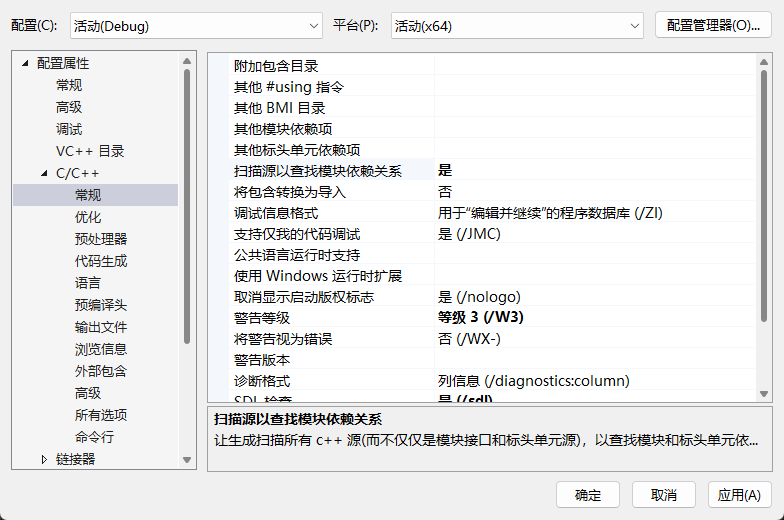
模块解决了重复头文件包含步骤冗余的问题,提高了编译速度(宏防护符只能避免重复包含的结果,而无法解决重复替换的动作)。模块和命名空间是正交的,也就是互相独立不影响的,正常使用即可。模块文件通常有以下后缀:
.ixx在Microsoft的MSVC编译器中常见.mpp一些编译器和开发者社区使用这个后缀.cppm这个后缀更符合C++文件的命名惯例,且被一些开发者所采用- 仍然使用
.cpp,因为它们在很多方面与普通的Cpp源文件相似
模块使用起来非常简单,以下是简单的代码测试,使用 export 导出模块内容,使用 import 导入模块内容,使用 export module ... 声明一个模块文件,使用 export import ... 导出一个模块文件。
// test_model.cppm
export module tese_model;

import <iostream>; // 等价于 #include <iostream>

int a = 10; // 对外隐藏对内可以使用

export namespace my_test {
void Func(int num) {
	std::cout << "Hello, C++20 and num = " << num << std::endl;
}

int b = a;
} // namespace my_test end
// main.cpp
import tese_model; // 导入模块
int main() {
my_test::Func(); // 使用模块中的函数
return 0;
}多个模块的请款下
// a.cppm
export module A;

export char const* hello() { return "hello"; }
// b.cppm
export module B;
export import A; // 导出别的模块
export char const* world() { return "world"; }// main.cpp
import <iostream>;
import B;
int main() {
std::cout << hello() << ' ' << world() << '\n';
return 0;
}也可以结合命名空间和 export{} 序列写出更加简洁的代码。
// test_model.cppm
export module tese_model;

import <iostream>;

int a = 10; // 对外隐藏对内可以使用

export namespace my_test {
void Func(int num) {
	std::cout << "Hello, C++20 and num = " << num << std::endl;
}

int b = a;
} // namespace my_test end
// main.cpp
import tese_model;
int main() {
my_test::Func(my_test::b); // 无法直接使用 a
// Func(a); // 无法直接这么使用
return 0;
}// a.cppm
export module A;
export char const* hello() { return "hello"; }也可以做出类似 include 的声明定义分离的做法。
// test.cppm(模块内容声明部分)
export module A;

export const char* Hello();
export const char* World();
// test_lib_1.cppm(模块内容定义部分)
export module A;
export const char* Hello() { return "hello "; }// test_lib_2.cppm(模块内容定义部分)
export module A;
export const char* World() { return "world\n"; }// main.cpp(使用模块)
import <iostream>;
import A;
int main() {
std::cout << Hello() << World();
return 0;
}一个模块声明可以拥有多个模块定义,这取决于您的使用。不过更加规范的写法,是使用模块分区。
// test_lib_1.cppm(模块内容定义部分)
export module A:a;

export const char* Hello() { return "hello "; }
// test_lib_2.cppm(模块内容定义部分)
export module A:b;
export const char* World() { return "world\n"; }// test.cppm(模块内容声明部分)
export module A;
export const char* Hello();
export const char* World();
import:a;
import:b;// main.cpp(使用模块)
import <iostream>;
import A;
int main() {
std::cout << Hello() << World();
return 0;
}